![full-logo-one-line-transparent.png]](https://portal.agency-focus.com/hs-fs/hubfs/full-logo-one-line-transparent.png?height=40&name=full-logo-one-line-transparent.png)
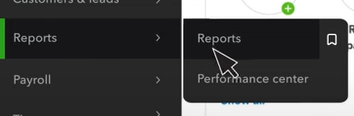
Step 1 - Open 'Reports'
From the sidebar on your Quickbooks dashboard, hover on the label that says 'Reports' and then select the option that says 'Reports':
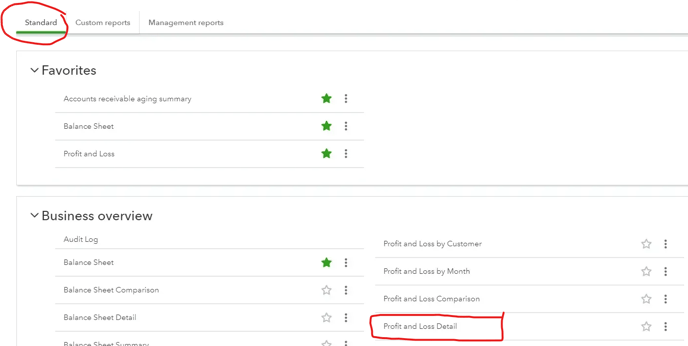
Step 2 - Select the 'Profit and Loss Detail' Report
- Make sure that you're looking in the 'Standard' reports tab
- Scroll down to the section titled Business Overview
- Select the option that says 'Profit and Loss Detail'
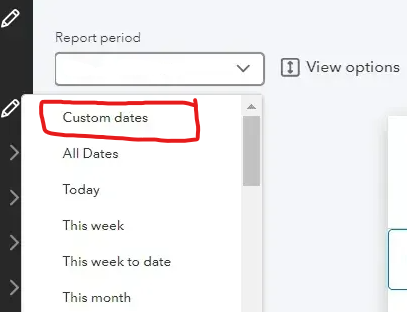
Step 3 - Set the report's date range
- Locate the dropdown labeled 'Report period'
- Select 'Custom dates'
- Configure the date range of the report
- Note: Please refer back to the data request form(s) you received if you're not sure what dates to enter here. If you're still unsure, please reach out to your consultant or Thomas Mann (thomas@agency-focus.com) for clarification -- we're here to help!
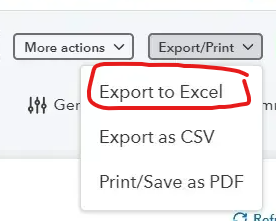
4. Export to Excel
- Click the dropdown labeled 'Export/Print' in the top right corner of the report page
- Select 'Export to Excel' and save the file onto your computer
Repeat steps 3-4 as needed until you have all of the reports you need.
Thank you for reading!
Please let us know if you're struggling with this. A member of our team would be happy to meet with you and discuss further.
For additional help, please reach out to our COO Thomas Mann. You can schedule a meeting with him using his digital calendar or email him directly (thomas@agency-focus.com).